
Announcing GravityCalendar 2.8: New multi-month layouts!
We’re excited to announce the release of GravityCalendar 2.8! This latest update brings two new calendar layouts: “Multi-Month (Grid)” and “Multi-Month (Stack)”. These new layouts let you display multiple months of events at a glance, making it easier than ever for users to plan...

We’re excited to announce the release of GravityCalendar 2.8! This latest update brings two new calendar layouts: “Multi-Month (Grid)” and “Multi-Month (Stack)”.
These new layouts let you display multiple months of events at a glance, making it easier than ever for users to plan ahead and visualize upcoming schedules. Find out everything you need to know about GravityCalendar 2.8 below!
New multi-month grid and stack layouts
We have now added support for two new calendar layouts. The “Multi-Month (Grid)” layout enables you to show multiple calendar months in a customizable grid. This is handy for viewing past and future events at a glance. The “Mult-Month (Stack)” layout simply stacks multiple months of events on top of each other.
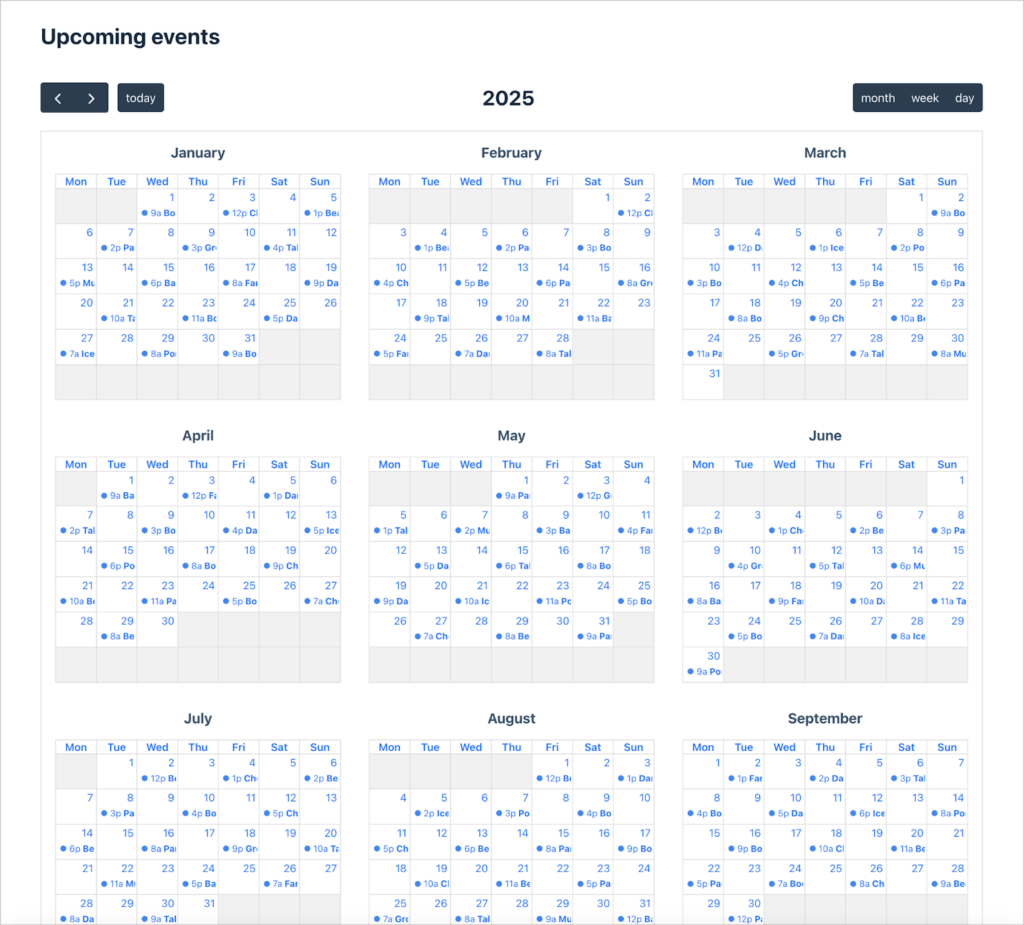
The grid is customizable, enabling you to select the number of months you want to show at once.

- Default Layout: GravityCalendar supports several different layouts. In this release, we’ve added two new options: “Multi-Month (Grid)” and “Multi-Month (Stack)”.
- Number of Months: Select how many months of events should be displayed.
The two new layouts can also be added as calendar controls which enable users to toggle different layouts directly from the front-end.

FullCalendar updated to version 6
GravityCalendar is built on the powerful FullCalendar script. In this update, we’ve upgraded to the latest FullCalendar 6! This upgrade brings enhanced performance, smoother interactions, and full compatibility with the newest FullCalendar features.
Upgrade GravityCalendar now
With the addition of multi-month layouts in GravityCalendar 2.8, managing events and schedules has never been easier. We’re thrilled to keep delivering powerful features that add flexibility and functionality to your calendars.
Upgrade to GravityCalendar 2.8 today and make the most of these exciting new layouts!

Helpful tips right in your inbox.
Subscribe to get the latest articles, information on releases and helpful Gravity Forms tips!
More articles

Random Test
Let’s compare comparision with regular post

SHORTCODE TEST
Normal shortcodes akjdhajksd [gravityview id=”123″] asdasd [gvlogic] asdasd asdasd [gv_entry_link] asdasd Shortcodes with inline code akjdhajksd [gravityview id=”123″] asdasd [gvlogic] asdasd asdasd [gv_entry_link] asdasd Shortcodes escaped akjdhajksd [[gravityview id=”123″]] asdasd [[gvlogic]] asdasd asdasd [[gv_entry_link]] asdasd this is the [[gvlogic]] shortcode this is the [[gvlogic]]…

How to create a dynamic careers page on WordPress using GravityKit
In this tutorial, you’ll learn how to build a fully functional and user-friendly careers page using Gravity Forms and GravityView. We’ll walk through creating job listings, application forms, and admin views so visitors can browse open positions and apply directly, while hiring teams can…