
New Release: Introducing Auto-Update for DataTables
We’re pleased to announce a new feature release for the GravityView DataTables layout: Auto-Update! Enabling the new “Auto-Update” feature means your DataTable will refresh its data automatically on a schedule that you set (e.g. every 5 minutes). This is game-changing if you’re looking to...

We’re pleased to announce a new feature release for the GravityView DataTables layout: Auto-Update!
Enabling the new “Auto-Update” feature means your DataTable will refresh its data automatically on a schedule that you set (e.g. every 5 minutes).
This is game-changing if you’re looking to create live-updating applications that display new entries as they’re added without the need for a page reload or a user action.
The possibilities are endless! For example:
- Display donations on a live-updating leaderboard
- Create a dynamic business dashboard
- Show new contest entries as they’re submitted
Previously, new data would not show up in the table immediately unless the user performed an action that forced the DataTable to fetch data from the server (such as performing a search).
How to enable Auto-Update
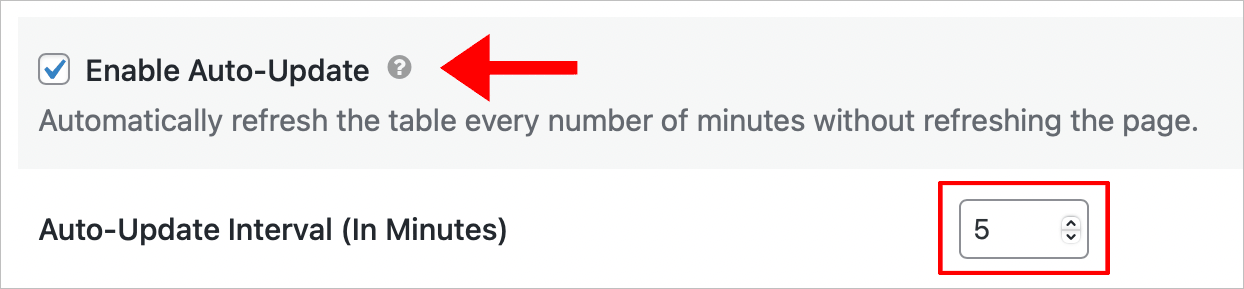
To enable the new Auto-Update feature, click on the DataTables tab in the View Settings and check the box that says “Enable Auto-Update”. After that, you’ll see a new input box appear allowing you to set the auto-update interval.
The default value is “5”, meaning that every 5 minutes, the DataTable will reload its contents based on the current filter and search configuration.
We’re excited to keep improving our DataTables layout to help you build live-updating tables and dynamic applications with GravityView!
To learn more about this new feature, check out the article on our docs site.

Helpful tips right in your inbox.
Subscribe to get the latest articles, information on releases and helpful Gravity Forms tips!
More articles

Random Test
Let’s compare comparision with regular post

SHORTCODE TEST
Normal shortcodes akjdhajksd [gravityview id=”123″] asdasd [gvlogic] asdasd asdasd [gv_entry_link] asdasd Shortcodes with inline code akjdhajksd [gravityview id=”123″] asdasd [gvlogic] asdasd asdasd [gv_entry_link] asdasd Shortcodes escaped akjdhajksd [[gravityview id=”123″]] asdasd [[gvlogic]] asdasd asdasd [[gv_entry_link]] asdasd this is the [[gvlogic]] shortcode this is the [[gvlogic]]…

How to create a dynamic careers page on WordPress using GravityKit
In this tutorial, you’ll learn how to build a fully functional and user-friendly careers page using Gravity Forms and GravityView. We’ll walk through creating job listings, application forms, and admin views so visitors can browse open positions and apply directly, while hiring teams can…