
Introducing GravityActions: Bulk Update Gravity Forms Entries
Updating entries in Gravity Forms can be a pain in the neck. Editing each entry one-by-one is tedious, time-consuming, and error-prone. Furthermore, spending your precious time on repetitive tasks ruins your productivity! Now there’s a better way 🎉 Introducing GravityActions – a brand new...

Updating entries in Gravity Forms can be a pain in the neck. Editing each entry one-by-one is tedious, time-consuming, and error-prone. Furthermore, spending your precious time on repetitive tasks ruins your productivity! Now there’s a better way 🎉
Introducing GravityActions – a brand new add-on for Gravity Forms that allows you to bulk update your form entries in the blink of an eye (nearly light speed! 👨🚀).
With GravityActions, you can massively boost your productivity by spending less time getting more done. Change orders from “confirmed” to “shipped” en masse, bulk update user registration details, easily correct submissions with errors, and modify multiple field values at the same time.
Optimize your workflow with this essential addition to your Gravity Forms “stack” 🙌
See GravityActions in action
What does GravityActions do?
GravityActions allows you to bulk update Gravity Forms entries without writing any code. You can edit hundreds of entries in the blink of an eye and modify multiple field values at the same time.
Who is GravityActions for?
GravityActions is for anyone who spends unnecessary amounts of time updating or editing existing entries in Gravity Forms. Say goodbye to complicated workarounds or custom-coded solutions – GravityActions is lightweight, reliable, and lightning-fast ⚡
How does GravityActions’ bulk edit work?
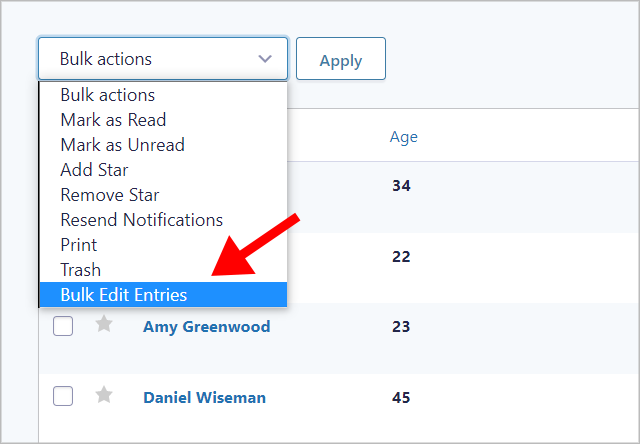
After installing GravityActions, you’ll see a new item in the Bulk actions menu on the Gravity Forms Entries page. Simply select the entries you want to modify (or bulk select all of them), choose the Bulk Edit Entries option, and hit Apply.
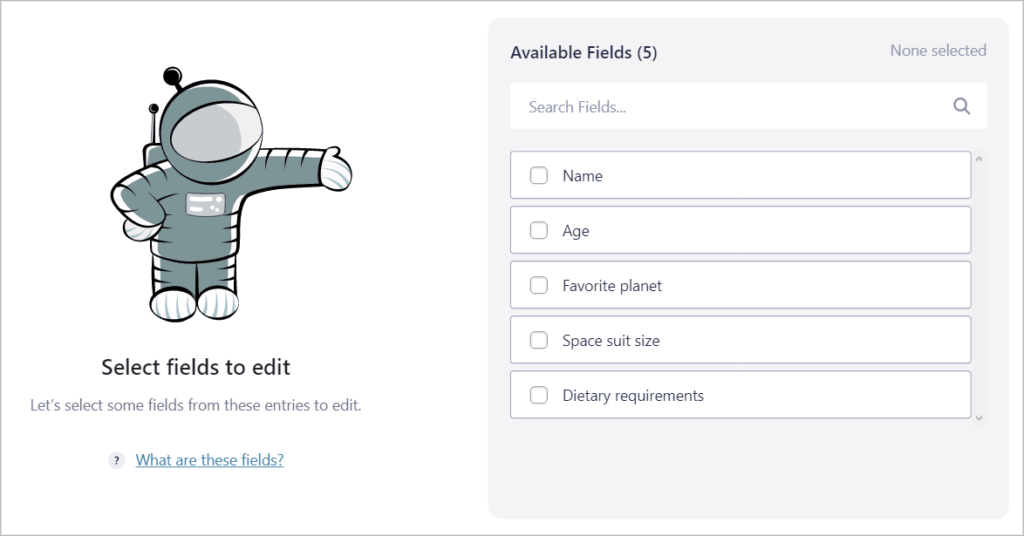
A new window will then open prompting you to select the fields you want to edit.
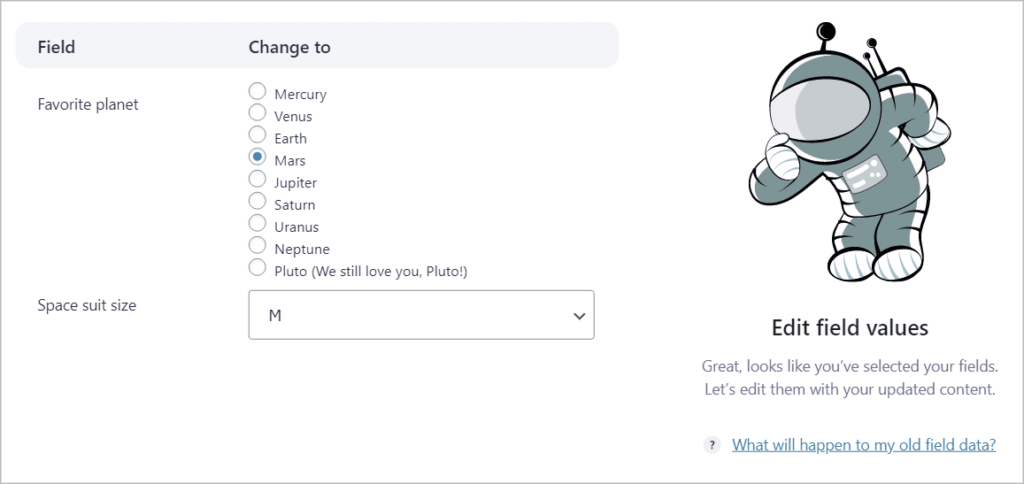
After selecting one or more fields to edit, the next step is to update the field value(s) with your new content.
Finally, you’ll see a summary of your updates. You can press “back” at any point to go back to the previous step without losing any of your changes!

After confirming your changes, GravityActions will work its magic by bulk updating your chosen form entries.
The page will then reload and you’ll see your new changes right away on the Gravity Forms Entries page.
Get GravityActions today!
GravityActions is a powerful new addition to our suite of essential Gravity Forms add-ons 🎊
The plugin allows you to save precious time by bulk updating Gravity Forms entries. You can edit hundreds of entries in the blink of an eye and modify multiple field values at the same time!
GravityActions is now available for purchase directly from our website. So what are you waiting for? After taking the plugin for a spin, be sure to let us know what you think!
Included in GravityKit All Access!
If you’re a GravityKit All Access customer, you can install GravityActions at no additional cost! Simply log in to your WordPress Admin and head over to the Manage Add-Ons page where you’ll see GravityActions ready to install.
Got any questions about GravityActions? Check out our documentation or reach out to our support team!

Helpful tips right in your inbox.
Subscribe to get the latest articles, information on releases and helpful Gravity Forms tips!
More articles

Random Test
Let’s compare comparision with regular post

SHORTCODE TEST
Normal shortcodes akjdhajksd [gravityview id=”123″] asdasd [gvlogic] asdasd asdasd [gv_entry_link] asdasd Shortcodes with inline code akjdhajksd [gravityview id=”123″] asdasd [gvlogic] asdasd asdasd [gv_entry_link] asdasd Shortcodes escaped akjdhajksd [[gravityview id=”123″]] asdasd [[gvlogic]] asdasd asdasd [[gv_entry_link]] asdasd this is the [[gvlogic]] shortcode this is the [[gvlogic]]…

How to create a dynamic careers page on WordPress using GravityKit
In this tutorial, you’ll learn how to build a fully functional and user-friendly careers page using Gravity Forms and GravityView. We’ll walk through creating job listings, application forms, and admin views so visitors can browse open positions and apply directly, while hiring teams can…