
New Release: Introducing Inline Edit 1.5
We’re pleased to announce the release of Inline Edit 1.5! This update sees support for Entry Revisions, the ability to disable inline editing for specific fields, and a host of other improvements 😎 Support for Entry Revisions Our Entry Revisions add-on allows you to...

We’re pleased to announce the release of Inline Edit 1.5!
This update sees support for Entry Revisions, the ability to disable inline editing for specific fields, and a host of other improvements 😎
Support for Entry Revisions
Our Entry Revisions add-on allows you to track changes made to Gravity Forms entries and restore prior versions.
Previously, Entry Revisions would ignore changes made using Inline Edit. That’s no longer the case with Inline Edit 1.5!
Now, if you have Entry Revisions active on your website and you make changes to an entry using Inline Edit, these changes will be saved as an entry revision. This setting can also be enabled/disabled on individual forms thanks to a new option on the form settings page.
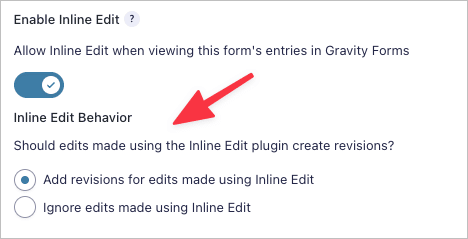
📝 This feature requires Gravity Forms Entry Revisions 1.1 or newer.
Check out our documentation to learn more about how Inline Edit works with Entry Revisions.
Disable Inline Edit for Specific Fields
You can now disable Inline Edit for specific fields in GravityView. Here’s how it works:
First, ensure that Inline Edit is enabled in the View Settings.

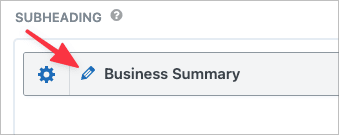
Next, click on the gear icon next to the field label to open up the field settings. Under “Advanced” you’ll see a new option to enable or disable editing with Inline Edit.

When inline Edit is enabled, you’ll see a new pencil icon next to the field label in GravityView.
We hope you’re as excited about this update as we are! If you’d like to read the full release, checkout the Inline Edit changelog (hint: it’s at the bottom of the page).

Helpful tips right in your inbox.
Subscribe to get the latest articles, information on releases and helpful Gravity Forms tips!
More articles

Random Test
Let’s compare comparision with regular post

SHORTCODE TEST
Normal shortcodes akjdhajksd [gravityview id=”123″] asdasd [gvlogic] asdasd asdasd [gv_entry_link] asdasd Shortcodes with inline code akjdhajksd [gravityview id=”123″] asdasd [gvlogic] asdasd asdasd [gv_entry_link] asdasd Shortcodes escaped akjdhajksd [[gravityview id=”123″]] asdasd [[gvlogic]] asdasd asdasd [[gv_entry_link]] asdasd this is the [[gvlogic]] shortcode this is the [[gvlogic]]…

How to create a dynamic careers page on WordPress using GravityKit
In this tutorial, you’ll learn how to build a fully functional and user-friendly careers page using Gravity Forms and GravityView. We’ll walk through creating job listings, application forms, and admin views so visitors can browse open positions and apply directly, while hiring teams can…