
GravityView version 1.17 (it’s a big one!)
Version 1.17 includes over 244 changes, affecting more than 10,000 lines of code. There are tons of new features, and even more bug fixes. Here are a few highlights: Front-end entry notes for Gravity Forms You can now display, add, and delete entry notes...


Version 1.17 includes over 244 changes, affecting more than 10,000 lines of code. There are tons of new features, and even more bug fixes. Here are a few highlights:
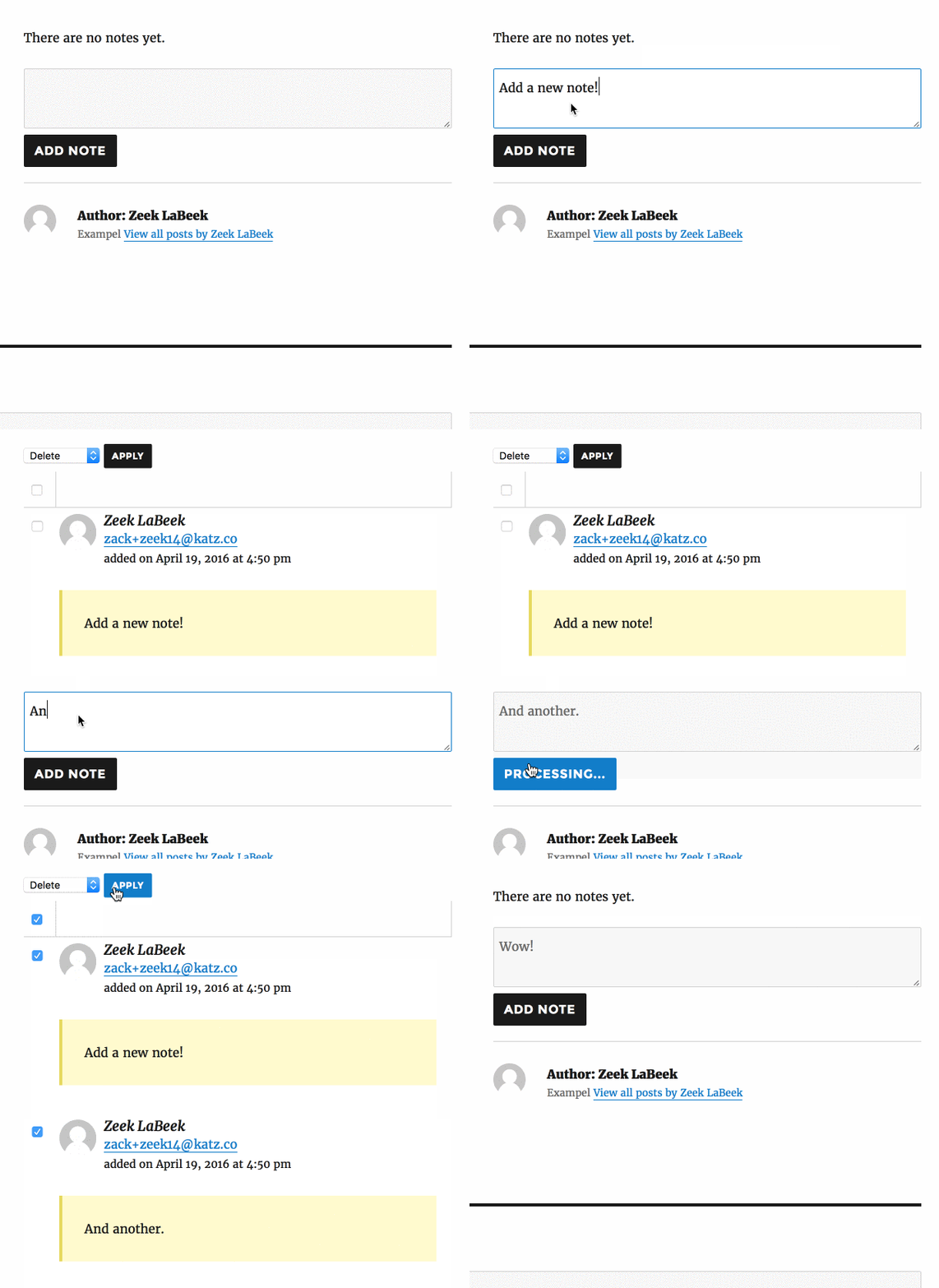
Front-end entry notes for Gravity Forms
You can now display, add, and delete entry notes from the front-end of your site. It’s slick:
Improved Search Bar design
We completely revamped how the GravityView search form looks. The changes mean that the search form now looks great on all screen sizes, including mobile.

The search form now looks good with a large number of fields.
RTL
We’ve added support in our templates for right-to-left languages. If your site is in a RTL language, the layout will automatically adjust.
Fully Gravity Forms 2.0 compatible
The previous versions of GravityView are also compatible, so is it cheating to say so? I don’t think so: GravityView 1.17 is (still) fully compatible with Gravity Forms 2.0.
View a full list of changes
Here are a few more additions:
- Added option to make Phone numbers click-to-call
- Improved support for showing GravityFlow step details
- Added: Merge Tag modifiers – now set a maximum length of content, and automatically add paragraphs to Merge Tags. Read how to use the new Merge Tag modifiers
We hope you love the new changes to GravityView! As always, if you have any questions, please contact us.

Helpful tips right in your inbox.
Subscribe to get the latest articles, information on releases and helpful Gravity Forms tips!
More articles

Random Test
Let’s compare comparision with regular post

SHORTCODE TEST
Normal shortcodes akjdhajksd [gravityview id=”123″] asdasd [gvlogic] asdasd asdasd [gv_entry_link] asdasd Shortcodes with inline code akjdhajksd [gravityview id=”123″] asdasd [gvlogic] asdasd asdasd [gv_entry_link] asdasd Shortcodes escaped akjdhajksd [[gravityview id=”123″]] asdasd [[gvlogic]] asdasd asdasd [[gv_entry_link]] asdasd this is the [[gvlogic]] shortcode this is the [[gvlogic]]…

How to create a dynamic careers page on WordPress using GravityKit
In this tutorial, you’ll learn how to build a fully functional and user-friendly careers page using Gravity Forms and GravityView. We’ll walk through creating job listings, application forms, and admin views so visitors can browse open positions and apply directly, while hiring teams can…