
GravityView version 1.18
Version 1.18 has lots of bug fixes and improvements. But the biggest change is the addition of a new entry approval status: “Unapproved”. Unapproved entries have not been approved or disapproved yet. Before, it was hard to know which entries were rejected and which...


Version 1.18 has lots of bug fixes and improvements. But the biggest change is the addition of a new entry approval status: “Unapproved”. Unapproved entries have not been approved or disapproved yet. Before, it was hard to know which entries were rejected and which were not yet reviewed. Now, it’s easy to tell in a glance. A yellow circle means an entry hasn’t been reviewed yet.

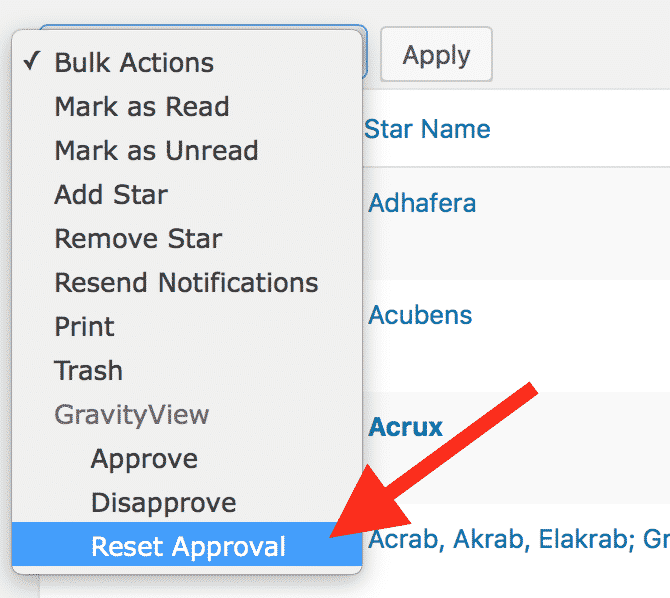 We’ve also added a matching option to the Bulk Actions dropdown that allows you to “Reset Approval” for entries.
The point is Front-end Approvals
There was a lot going on behind the scenes in this release to pave the way for front-end approvals in the next major update. This feature will make it a breeze to moderate entries without ever logging in to the WordPress Dashboard. We know this is a common request, and it’s coming soon!
Get GravityView Now Don’t have GravityView yet? Purchase today and get started!
Other changes in 1.18
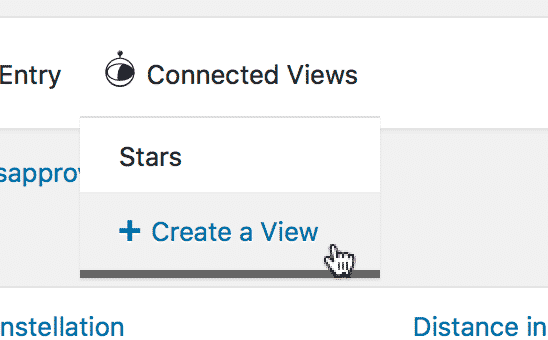 There’s a new “Create a View” link under GravityView’s “Connected Views” menu in Gravity Forms. This makes it simple to create a new View from a form. Before, you’d have to go to Views > New View, then select the form. Now, you just click a link! We’re also glad to have full translation of our plugin in German! 🇩🇪 Thanks to our new translator, Hubert.
All changes in this release
- Updated minimum requirements: WordPress 3.5, Gravity Forms 1.9.14
- Modified: Entries that are unapproved (not approved or disapproved) are shown as yellow circles
- Added: Shortcut to create a View for an existing form
- Added: Entry Note emails now have a message “This note was sent from {url}” to provide context for the note recipient
- Fixed: Edit Entry did not save other field values when Post fields were in the Edit Entry form
- Fixed: When using “Start Fresh” View presets, form fields were not being added to the “Add Field” field picker
- Fixed: Hidden visible inputs were showing in the “Add Field” picker (for example, the “Middle Name” input was hidden in the Name field, but showing as an option)
- Fixed: Fatal error when editing Post Content and Post Image fields
- Fixed: Lightbox images not loading
- Fixed: Lightbox loading indicator displaying below the overlay
- Fixed: “New form created” message was not shown when saving a draft using a “Start Fresh” View preset
- Gravity Forms User Registration Addon changes:
- Gravity Forms User Registration 2.0 is no longer supported
- Fixed Processing “Update User” feeds
- Fixed: Inactive User Registration feeds were being processed
- Fixed: User Registration “Update User” feeds were being processed, even if the Update Conditions weren’t met
- Fixed: Unable to use
gravityview/edit_entry/user_registration/trigger_updatefilter - Fixed: Prevent negative entry counts when approving and disapproving entries
- Fixed: PHP notice when WooCommerce Memberships is active
- Tweak: Entry Note emails now have paragraphs automatically added to them
- Tweak: When the global “Show Support Port” setting is “Hide”, always hide; if set to “Show”, respect each user’s Support Port display preference
- Updated: Complete German translation—thank you hubert123456!
Developer Notes
- Migrated
is_approvedentry meta values; statuses are now managed by theGravityView_Entry_Approval_Statusclass - “Approved” =>
1, useGravityView_Entry_Approval_Status::APPROVEDconstant - “0” =>
2, useGravityView_Entry_Approval_Status::DISAPPROVEDconstant - Use
$new_value = GravityView_Entry_Approval_Status::maybe_convert_status( $old_value )to reliably translate meta values - Added:
GVCommon::get_entry_id()method to get the entry ID from a slug or ID - Added:
gravityview_go_back_urlfilter to modify the link URL used for the single entry back-link ingravityview_back_link()function - Added:
gravityview/field/notes/wpautop_emailfilter to disablewpautop()on Entry Note emails - Added:
$email_footerto thegravityview/field/notes/email_contentfilter content - Modified:
note-add-note.phptemplate: addedcurrent-urlhidden field - Modified:
list-single.phptemplate file: added.gv-grid-col-1-3CSS class to the.gv-list-view-content-imagecontainer - Fixed: Mask the Entry ID in the link to lightbox files

Helpful tips right in your inbox.
Subscribe to get the latest articles, information on releases and helpful Gravity Forms tips!
More articles

Random Test
Let’s compare comparision with regular post

SHORTCODE TEST
Normal shortcodes akjdhajksd [gravityview id=”123″] asdasd [gvlogic] asdasd asdasd [gv_entry_link] asdasd Shortcodes with inline code akjdhajksd [gravityview id=”123″] asdasd [gvlogic] asdasd asdasd [gv_entry_link] asdasd Shortcodes escaped akjdhajksd [[gravityview id=”123″]] asdasd [[gvlogic]] asdasd asdasd [[gv_entry_link]] asdasd this is the [[gvlogic]] shortcode this is the [[gvlogic]]…

How to create a dynamic careers page on WordPress using GravityKit
In this tutorial, you’ll learn how to build a fully functional and user-friendly careers page using Gravity Forms and GravityView. We’ll walk through creating job listings, application forms, and admin views so visitors can browse open positions and apply directly, while hiring teams can…