
Version 1.19
Version 1.19 adds front-end entry moderation to GravityView. This makes it much easier to manage your directory submissions. We also added a Russian translation to GravityView, which we’re thrilled about. Добро пожаловать! 🇷🇺 Full changelog: New: Front-end entry moderation! You can now approve and...

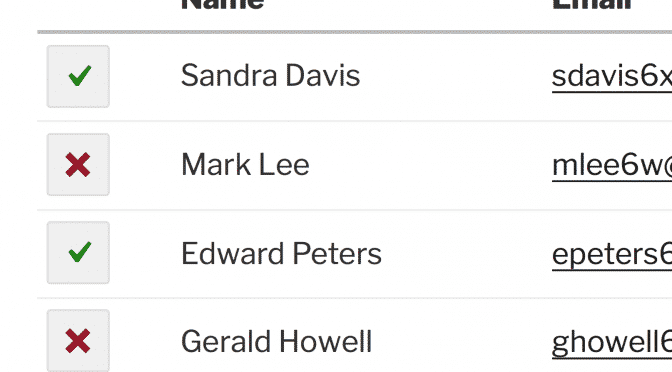
Version 1.19 adds front-end entry moderation to GravityView. This makes it much easier to manage your directory submissions. We also added a Russian translation to GravityView, which we’re thrilled about. Добро пожаловать! 🇷🇺
Full changelog:
- New: Front-end entry moderation! You can now approve and disapprove entries from the front of a View – learn how to use front-end entry approval
- Add entry moderation to your View with the new “Approve Entries” field
- Displaying the current approval status by using the new “Approval Status” field
- Views have a new “Show all entries to administrators” setting. This allows administrators to see entries with any approval status. Learn how to use this new setting
- Fixed: Approval values not updating properly when using the “Approve/Reject” and “User Opt-In” fields
- Tweak: Show inactive forms in the Data Source form dropdown
- Tweak: If a View is connected to a form that is in the trash or does not exist, an error message is now shown
- Tweak: Don’t show “Lost in space?” message when searching existing Views
- Added: New Russian translation – thank you, George Kovalev!
- Updated: Spanish translation (thanks @matrixmercury)
Developer Notes:
- Added:
field-approval.cssCSS file. Learn how to override the design here. - Modified: Removed the bottom border on the “No Results” text (
.gv-no-resultsCSS selector) - Fixed: Deprecated
get_bloginfo()usage

Helpful tips right in your inbox.
Subscribe to get the latest articles, information on releases and helpful Gravity Forms tips!
More articles

Random Test
Let’s compare comparision with regular post

SHORTCODE TEST
Normal shortcodes akjdhajksd [gravityview id=”123″] asdasd [gvlogic] asdasd asdasd [gv_entry_link] asdasd Shortcodes with inline code akjdhajksd [gravityview id=”123″] asdasd [gvlogic] asdasd asdasd [gv_entry_link] asdasd Shortcodes escaped akjdhajksd [[gravityview id=”123″]] asdasd [[gvlogic]] asdasd asdasd [[gv_entry_link]] asdasd this is the [[gvlogic]] shortcode this is the [[gvlogic]]…

How to create a dynamic careers page on WordPress using GravityKit
In this tutorial, you’ll learn how to build a fully functional and user-friendly careers page using Gravity Forms and GravityView. We’ll walk through creating job listings, application forms, and admin views so visitors can browse open positions and apply directly, while hiring teams can…