
GravityView version 1.5: New edit entry configuration options
Version 1.5 brings a big feature: the ability to customize and configure what fields are editable. Our customers were clear what feature we needed to add to make GravityView more amazing: the ability to customize the Edit Entry screen. We did it, and boy...

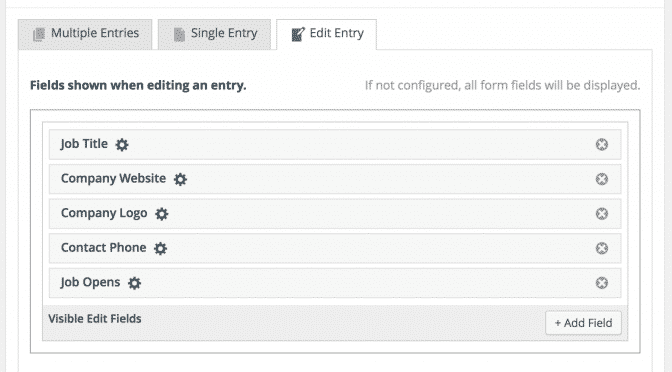
Version 1.5 brings a big feature: the ability to customize and configure what fields are editable.
Our customers were clear what feature we needed to add to make GravityView more amazing: the ability to customize the Edit Entry screen. We did it, and boy is it great.
Check out our comprehensive walkthrough on how to use the new functionality.
We’re hard at work adding other great features to GravityView; chime in on what to add next on our ideas forum.
Version 1.5 on November 12
- Added: New “Edit Entry” configuration
- Configure which fields are shown when editing an entry
- Set visibility for the fields (Entry Creator, Administrator, etc.)
- Set custom edit labels
- Fixed: Single entry view now respects View settings
- If an entry isn’t included in View results, the single entry won’t be available either
- If “Show Only Approved” is enabled, prevent viewing of unapproved entries
- Respects View filters, including those added by the Advanced Filtering extension
- Fixed: Single entry Go back button context on Embedded Views
- Fixed: Delete signature fields in Edit Entry (requires the Gravity Forms Signature Addon)
- Fixed: Gravity Forms tooltip translations being overridden
- Added: Choose to open the link from a website field in the same window (field option)
- Updated: Spanish (Mexican) translation by @jorgepelaez, Dutch translation by @erikvanbeek and @leooosterloo, Turkish translation by @suhakaralar

Helpful tips right in your inbox.
Subscribe to get the latest articles, information on releases and helpful Gravity Forms tips!
More articles

Random Test
Let’s compare comparision with regular post

SHORTCODE TEST
Normal shortcodes akjdhajksd [gravityview id=”123″] asdasd [gvlogic] asdasd asdasd [gv_entry_link] asdasd Shortcodes with inline code akjdhajksd [gravityview id=”123″] asdasd [gvlogic] asdasd asdasd [gv_entry_link] asdasd Shortcodes escaped akjdhajksd [[gravityview id=”123″]] asdasd [[gvlogic]] asdasd asdasd [[gv_entry_link]] asdasd this is the [[gvlogic]] shortcode this is the [[gvlogic]]…

How to create a dynamic careers page on WordPress using GravityKit
In this tutorial, you’ll learn how to build a fully functional and user-friendly careers page using Gravity Forms and GravityView. We’ll walk through creating job listings, application forms, and admin views so visitors can browse open positions and apply directly, while hiring teams can…